Learning HTML for Kids!

What’s on this page?
What is HTML?
Text editors
Syntax
Chapter One
What is HTML anyway?
HTML stands for HyperText Markup Language. Developed by scientist Tim Berners-
When writing HTML, you add "tags" to the text in order to create the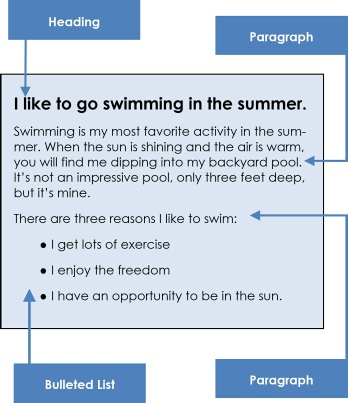 structure. These tags tell the browser how to display the text or graphics in the document. For example, the following document has a simple layout (structure). Notice there are three major parts: a heading, two paragraphs and a bulleted list.
Text editors
To achieve a similar layout in a browser, you use a text editor. This is where you put all your code and content. For the PC, it’s Notepad; for the MAC it’s TextEdit.
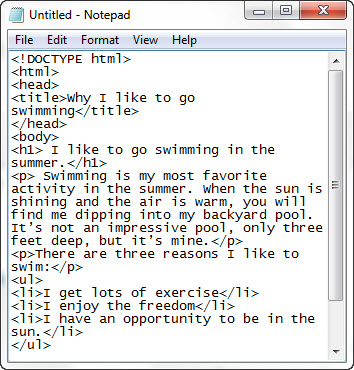
Below is the code (in green) and text for this page.
<html>
<head>
<title>Why I like to go swimming</title>
</head>
<body>
<h1> Why I like to go swimming in the summer. </h1>
<p> Swimming is my most favorite activity in the summer. When the sun is shining and the air is warm, you will find me dipping into my backyard pool. It’s not an impressive pool, only three feet deep, but it’s mine.</p>
<p>There are three reasons I like to swim:</p>
<ul>
<li>I get lots of exercise</li>
<li>I enjoy the freedom</li>
<li>I have an opportunity to be in the sun.</li>
</ul>
</body>
</html>
Here’s what it looks like in the Notepad Editor:
And here is the resulting page in a browser.
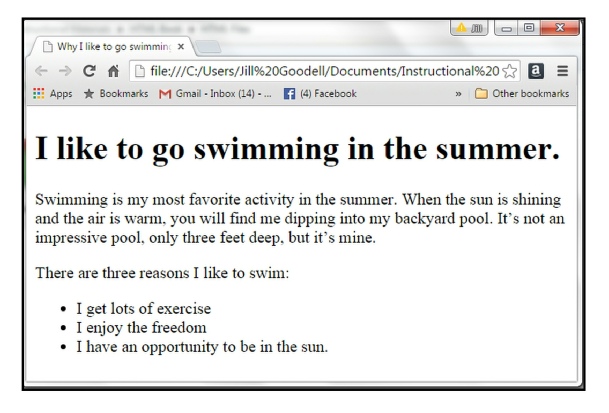
Notice the tags are gone in the browser? That’s because the tags tell the browser how to display files but do not show themselves.
Syntax: a new word to learn
If you look up the word syntax in the dictionary, you learn that it’s a set of rules on how to put words and phrases together in order to form good sentences. In other words, syntax means grammar.
It’s a bit different in computer language. According to Vangie Beal from Webopedia, Syntax:
“Refers to the spelling and grammar of a programming language. Computers are inflexible machines that understand what you type only if you type it in the exact form that the computer expects. The expected form is called the syntax.”
You’ll see this word a lot. It’s important to follow the syntax (how the code is written) exactly or your browser will not display your page properly.
Go to Chapter 2: Basic Concepts
Privacy Statement
Learning HTML for Kids
© 1999-